Test States
Quarantine a test so its failures stop blocking your CI, or skip it so it does not run at all.
A test state changes how your CI treats a test, on every branch, pipeline and job or only on the ones you name. A quarantined test still runs, but its failures no longer fail your CI. A skipped test does not run at all.
Choosing a state
Section titled Choosing a stateQuarantine a flaky or broken test while you fix it. Test Engine keeps collecting its runs, so its health stays visible and the quarantine can end on its own once the test recovers.
Skip a test that must not run, such as one that hangs or wipes a shared resource. A skipped test reports no failures, so nobody sees if it breaks. Mergify never removes a skip on its own.
Setting a state
Section titled Setting a stateA test holds at most one state on a given run: to skip a quarantined test, remove its quarantine first, or narrow where the quarantine applies.
From the Mergify dashboard
Section titled From the Mergify dashboardOn the Detection page, click a test, then Override: choose Quarantined or Skipped, where it applies, and why. To act on several tests at once, select them in the list: Quarantine quarantines or skips them, and Unquarantine and Unskip remove their states. See quarantine on Detection for the cleanups it suggests.
From the Mergify CLI
Section titled From the Mergify CLIThe Mergify CLI manages quarantines from a script or an AI coding agent:
# Quarantine a test.mergify tests quarantines add -r owner/repo \  --reason "flaky under load, fix in progress" \  "tests/auth/test_login.py::test_login_timeout"
# Remove it from quarantine.mergify tests quarantines remove -r owner/repo \  "tests/auth/test_login.py::test_login_timeout"
# List everything currently quarantined.mergify tests quarantines list -r owner/repo
A test quarantined on several branches, pipelines or jobs holds one quarantine
for each, so remove and get refuse its name: pass the quarantine ID that
add and list print.
From the API
Section titled From the APIThe test states API manages both states.
How a state applies in your CI
Section titled How a state applies in your CIA quarantine applies with every test framework integration, a JUnit report uploaded after the run included.
A skip needs the Mergify plugin for pytest, RSpec, Vitest, Playwright, Jest,
Mocha or Minitest, which keeps the test from running and reports it skipped,
with the reason Skipped by Mergify where the framework shows one. A test in a
JUnit report uploaded after the run is not skipped: it ran, and its failures
count. Neither state reaches a Jest or Playwright project not wrapped with
withMergify, or a Playwright test that does not import test from
@mergifyio/playwright.
When Mergify quarantines a test itself
Section titled When Mergify quarantines a test itselfMergify can also quarantine a test on its own, from the health status Detection assigns it. This is auto-quarantine, which you turn on per repository from the Configuration page. By default it quarantines flaky tests only; turn on Also Quarantine Broken Tests to quarantine broken tests too.
It waits until enough evidence backs the verdict, the same evidence it needs to rerun a test. Until then, you can quarantine it yourself.
Leaving quarantine automatically
Section titled Leaving quarantine automaticallyWith unquarantine_when_healthy turned on, Mergify removes a test from
quarantine once it is healthy again on every tracked branch, meaning Detection
no longer finds it flaky or broken. A test you fixed counts toward your CI
again without you going back to the dashboard.
The option is off by default. You can set it on a quarantine you create yourself, from the dashboard or the API. For the tests Mergify quarantines for you, turn on Unquarantine Recovered Tests Automatically on the Configuration page. Turning it on does not change quarantines that already exist.
Fixing a quarantined test with AI
Section titled Fixing a quarantined test with AIA quarantined test still needs a fix. Click it on the Detection page: each of its quarantines has a Fix with AI button, which turns what Mergify knows about the test into instructions for an AI coding agent.
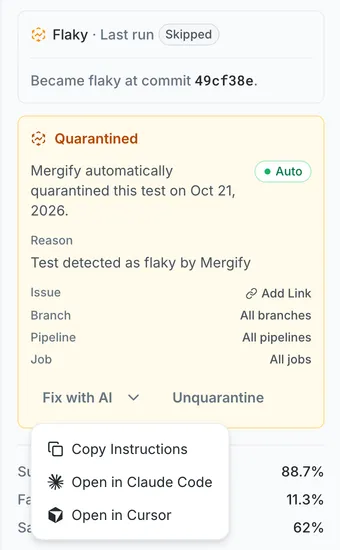
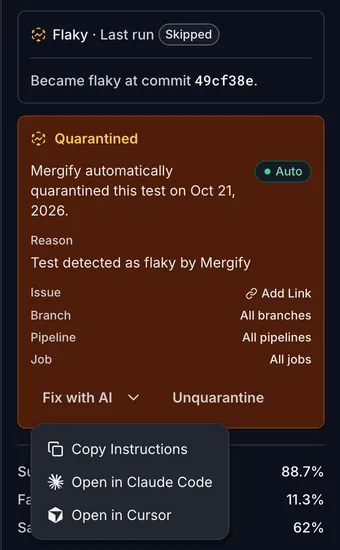
Copy Instructions copies them to paste into any agent. The other entries open Claude Desktop, Claude Code on the web, Claude Code in your terminal, or Cursor, with the instructions as the prompt.
The instructions ask the agent to reproduce the failure and fix its root cause, in the test or in the code under test, rather than delete or skip the test. Claude and Cursor cap a prompt’s length, so only Copy Instructions always carries them in full.
Staying notified
Section titled Staying notifiedEvery change of state, yours or Mergify’s, is an event on the dashboard, and Test Engine notifications can post them to a Slack channel.
Was this page helpful?
Thanks for your feedback!