Concepts
How Mergify Stacks maps Git commits to GitHub pull requests.
The Mental Model
Section titled The Mental ModelYou work on one local branch with multiple commits. Mergify Stacks maps each commit to its own GitHub pull request. The PRs are chained together: each one’s base branch is the previous PR’s head branch.
Reviewers see one small, focused diff per PR instead of the accumulated changes of the entire branch.
When you run mergify stack push, each commit goes through three stages:
Your local commits become remote branches, and each remote branch becomes a pull request. The Change-Id in each commit message is what ties all three together.
Change-Id
Section titled Change-IdThe Change-Id connects your local commits to their corresponding pull requests. It’s a unique identifier embedded as a Git trailer in each commit message:
feat: add user authentication
Implement JWT-based auth with refresh tokens.
Change-Id: Ia1b2c3d4e5f6a1b2c3d4e5f6a1b2c3d4e5f6a1b2
The Change-Id is:
-
Generated automatically by a
commit-msgGit hook installed during setup -
Persistent across rebases, amends, and history rewrites
-
The mapping key that Stacks uses to know which commit corresponds to which PR, even after you rewrite your branch
You never need to manage Change-Ids manually. They’re created once and preserved through all git operations.
Branch Mapping
Section titled Branch MappingWhen you run mergify stack push, each commit gets its own remote branch. The
naming convention is:
stack/{username}/{branch-name}/{commit-slug}--{change-id}{commit-slug} is derived from the commit title: the conventional commit
prefix is stripped, stop words are removed, and common words are abbreviated.
{change-id} is the first 8 hex characters of the commit’s Change-Id, which
keeps names unique when commit titles repeat.
For example, if user alice pushes a branch called feat/auth with 3 commits:
| Commit title | Remote Branch |
|---|---|
feat: add user data model | stack/alice/feat/auth/add-user-data-model--a1b2c3d4 |
feat: add registration endpoint | stack/alice/feat/auth/add-registration-endpoint--d4e5f6a7 |
test: add registration tests | stack/alice/feat/auth/add-registration-tests--b7c8d9e0 |
Readable branch names make git branch -a, gh pr list, and GitHub’s
branch dropdown easier to scan.
You can customize the branch prefix via Git config:
git config mergify-cli.stack-branch-prefix "my-prefix"--branch-prefix overrides it for a single run. It is accepted by
mergify stack push and by the commands that read the stack back
(mergify stack list, mergify stack open and mergify stack sync), so a
prefix passed on the command line has to be repeated on each of them. Set the
Git config if you would rather not.
mergify stack checkout takes no prefix: it resolves the stack from the
branch name or PR URL you give it, no matter who pushed it.
PR Chaining
Section titled PR ChainingEach PR targets the previous PR’s branch as its base, creating a dependency chain:
| Commit | PR Base | PR Head |
|---|---|---|
| A (first) | main | .../add-user-data-model--a1b2c3d4 |
| B (second) | .../add-user-data-model--a1b2c3d4 | .../add-registration-endpoint--d4e5f6a7 |
| C (third) | .../add-registration-endpoint--d4e5f6a7 | .../add-registration-tests--b7c8d9e0 |
When the push does not register the stack with GitHub’s own stacking API,
Stacks describes the chain itself. It posts a stack comment on every PR
listing the full chain, and adds a Depends-On: #NNN reference to every PR
description but the bottom one, which targets main and so depends on
nothing:
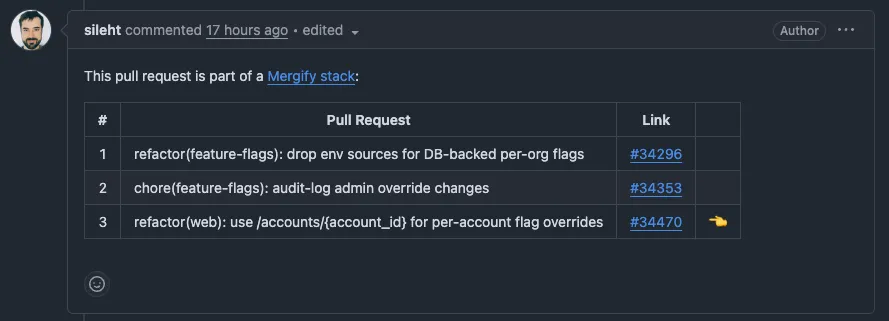
The stack comment shows where each PR sits in the chain, with links to jump between them. This gives both authors and reviewers a clear map of the entire change.
The Depends-On: #NNN marker isn’t only for humans. The
Merge Queue also uses it to recognize a stack and queue
it as a unit. Without the branch chain, the Depends-On: marker, and head
branches in the repository the stack targets, the queue treats each PR
independently. mergify stack push --no-github-native satisfies all three,
which is why a stack is pushed to the repository itself rather than to a fork.
A stack registered with GitHub’s own stacking API is the exception, and
mergify stack push registers one unless you pass
--no-github-native. GitHub holds the ordering
there and lists the stack’s members on each pull request page, so the
descriptions carry no Depends-On: marker. The push writes no stack comment
either, and deletes any comment an earlier push left behind. The queue
recognizes the PRs as a
GitHub-native stack
instead, and moves it as a unit all the same: queueing one member queues the
members below it, and they land from the bottom up.
Smart Updates
Section titled Smart UpdatesWhen you push again after making changes, Stacks doesn’t recreate everything. It compares each commit’s Change-Id and SHA against what’s already on GitHub:
-
Changed commits get their PR updated (force-push to the remote branch)
-
Unchanged commits are skipped entirely
-
Removed commits (after squashing or dropping) get their orphan remote branches deleted automatically
mergify stack push is always safe to run. It only does the minimum work needed
to sync your local branch with GitHub.
Next Steps
Section titled Next StepsSee Setup to install the CLI and configure your repository.
Was this page helpful?
Thanks for your feedback!