Merge Queue Batches
Increase your merge queue throughput and decrease your CI usage.
Batch merging lets you combine and merge multiple pull requests at once, instead of merging them one by one.
The batch merging process works by setting a batch_size option on your merge
queue. This option determines the number of pull requests that Mergify will
check at the same time using your CI. If the CI validation passes, Mergify
merges all the pull requests in the batch and closes the batch pull request it
created to test.
If a failure occurs, Mergify identifies the problematic pull request(s) automatically and removes them from the queue, allowing the rest of the queue to be processed as usual (see Handling Batch Failures).
This feature is especially useful for large-scale projects with many pull requests to merge, as it can reduce the time required to merge them all.
Understanding Batch Merging
Section titled Understanding Batch MergingBatch merging works by using the batch_size option in your Mergify queue
configuration. This option tells Mergify how many pull requests it should try
to combine and validate at once. The batch_size can be adjusted according to
the needs of your project, with a higher number indicating a larger batch size.
For example, if you set batch_size to 3, Mergify will create a batch pull
request that includes the changes from the next three pull requests in the
queue. This batch pull request is then validated by your CI system. If all
checks pass, then the three pull requests included in the batch are deemed
ready to be merged.
queue_rules: - name: default batch_size: 3This batch merging process allows multiple pull requests to be validated and merged more efficiently than if they were handled individually.
Configuring Batch Merging
Section titled Configuring Batch MergingConfiguring batch merging involves adjusting your Mergify configuration file to
set the batch_size option according to your project’s needs.
-
Open your Mergify configuration file.
-
Under
queue_rules, set thebatch_sizeoption to the number of pull requests you want to be tested together in a batch.
queue_rules: - name: default batch_size: 3In the above example, batches of up to 3 pull requests will be created and tested together.
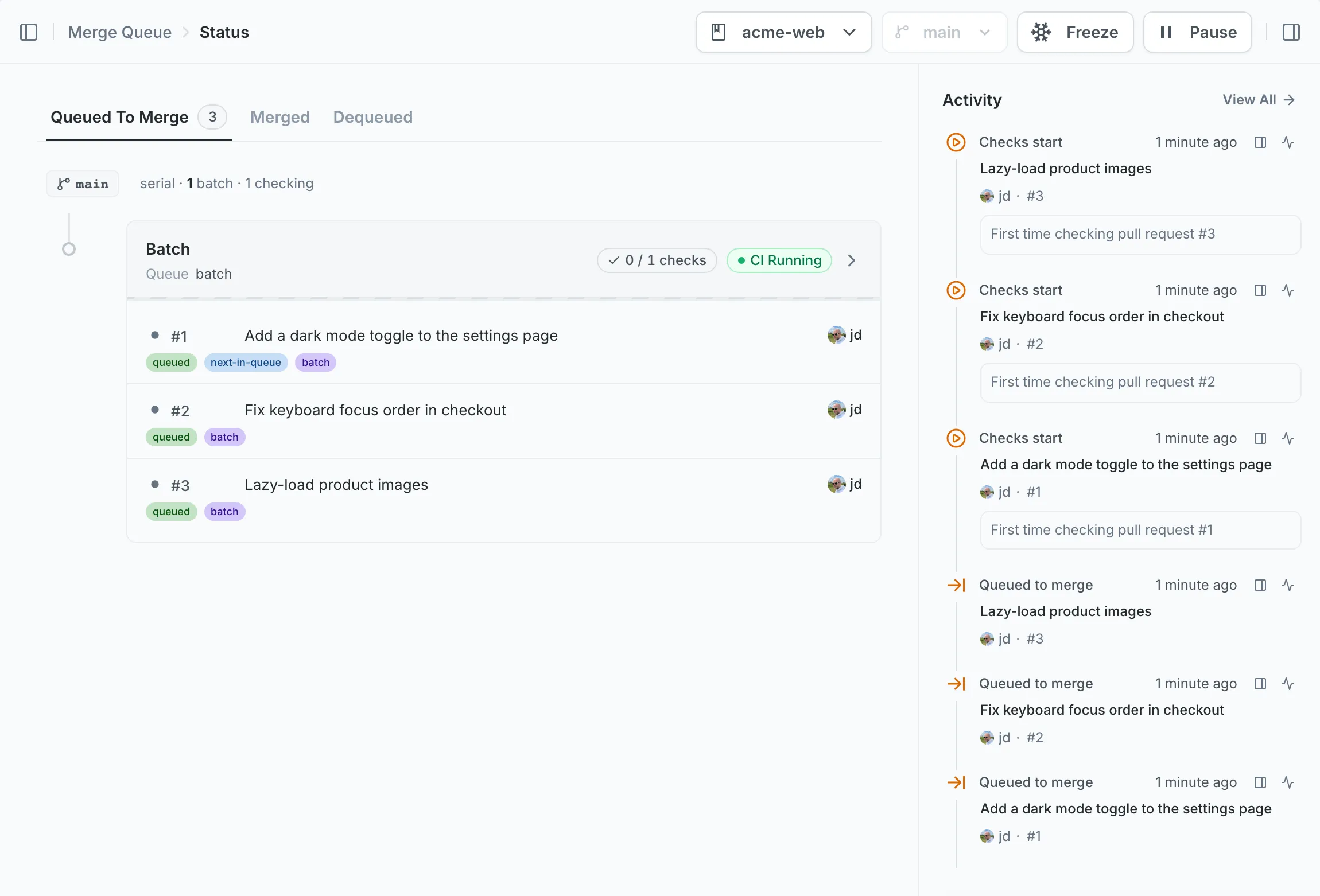
You can configure the delay that Mergify will use to wait for the batch to be
filled up using the batch_max_wait_time option.
queue_rules: - name: default batch_size: 5 batch_max_wait_time: 5 minWith the configuration above, Mergify waits up to 5 minutes for 5 PRs to enter the queue before creating a batch. This allows you to pick the right trade-off between latency and minimal CI usage.
Dynamic Batch Sizing
Section titled Dynamic Batch SizingThe examples above use a fixed batch_size: every batch holds the same number of
pull requests. Picking that number is a trade-off. Small batches keep latency low
and make failures cheap to isolate, but spend more CI. Large batches conserve CI
and clear a backlog faster, but a single failure forces Mergify to split and
retest more pull requests.
Dynamic batch sizing lets Mergify make that trade-off for you, in real time.
Instead of a single integer, set batch_size to a min and max range:
queue_rules: - name: default batch_size: min: 1 max: 10Mergify then spreads the queued pull requests across the available parallel checks and sizes each batch to stay small while keeping up with the queue:
-
When the queue is light, batches stay at
min, so each one is fast to validate and cheap to split when it fails. -
When the queue grows deeper than the parallel checks can drain at the smaller size, Mergify grows the batches toward
maxto keep the queue moving.
For example, with max_parallel_checks: 5 and a batch_size range of min: 1
to max: 2, three queued pull requests each become a batch of one, while ten
queued pull requests become five batches of two.
This gives low latency when traffic is light and high throughput when it spikes,
without retuning batch_size for every load pattern. Dynamic batch sizing works
the same way in every queue mode.
How Pull Requests Are Grouped Into a Batch
Section titled How Pull Requests Are Grouped Into a BatchWhen batch_size is greater than 1, Mergify has to decide which pull requests
go into a batch together. It does not simply take the next few pull requests
in the queue. Instead, it groups pull requests that touch similar parts of
your codebase, so each batch is a cohesive set of related changes. This makes
batch failures cheaper to resolve: when a batch fails and has to be
split, related changes stay together and
unrelated pull requests aren’t dragged into someone else’s failure.
This is how the default serial mode and
isolated mode both build their
batches. Parallel mode is the
exception: it groups pull requests by their exact set of scopes instead, in
queue order, so a pull request carrying api and frontend only ever shares a
batch with others carrying api and frontend. A stack still stays together
there: its pull requests are batched as if they carried the scopes of the
bottom pull request of the stack. See
Batching in parallel mode.
Grouping applies these rules in order of precedence: it never overrides priority or queue order, it always keeps a stack together, and only then does similarity fill whatever batch slots remain. The sections below follow that order.
Priority comes first
Section titled Priority comes firstGrouping never overrides priority or queue order. Mergify seeds each batch with the pull request that is next to merge: the highest priority, and the oldest among equal priorities. Similarity only ever breaks ties between pull requests of equal priority: a lower-priority pull request is never pulled ahead of a higher-priority one just because it is similar. Higher-priority pull requests always fill the batch first; lower priorities are only considered once the batch still has room.
Stacks stay together
Section titled Stacks stay togetherStacks are the next firm rule, applied before similarity is considered. When a pull request depends on earlier ones still in the queue (a stack), Mergify keeps the whole stack in one batch: whenever a pull request joins a batch, its queued predecessors join with it, whether or not they share its scopes or changed directories.
This is why stack relationships take precedence over scope and directory
similarity. A predecessor joins the batch because the dependency requires it,
not because it ranked highly. The only limit is batch_size: if the stack
doesn’t fit, the dependent pull request waits for a later batch rather than
being tested without the changes it builds on.
Filling the batch by similarity
Section titled Filling the batch by similarityPriority and stacks decide what a batch must contain. Similarity decides the
rest: which of the remaining equal-priority pull requests fill the slots that
are still free (up to batch_size). Mergify adds them one at a time, ranking
the candidates near the front of the queue by three criteria applied
in order, each one only breaking the ties the previous one leaves open:
-
Scopes. Mergify compares a candidate’s scopes against the batch’s as a proportion: the scopes the two have in common, out of every scope either side names. A candidate whose scopes match the batch’s exactly scores highest, and it outranks one that shares those scopes but names several more of its own.
-
Changed directories. When scopes don’t separate two candidates, Mergify compares the directories each pull request changes and prefers the one touching the same areas of the repository. On very large monorepos it automatically compares broader areas (parent directories) rather than every individual folder, so grouping stays effective whatever the repository size.
-
Queue time. If two pull requests are still tied, the one that has been waiting longest joins the batch first, keeping first-in, first-out order.
Scopes always take precedence over directories; the changed directories only decide the grouping when scopes leave it open. In practice this depends on your configuration: if you have configured scopes, pull requests are grouped by scope and the directory signal stays out of the way. If you have not, every pull request reports no scope, so that signal is a tie for all of them and grouping falls back entirely to the directories they change.
Because of this, a pull request further down the queue may join an earlier batch when it is similar to what is already there, while a closer but unrelated pull request waits for the next batch:
Here the queue order is PR #1, #2, #3, #4. PR #3 changes the same area as PR #1
(api/), so it joins PR #1 in the first batch even though PR #2 was queued
earlier. PR #2 and PR #4, which touch unrelated areas, fall into the next batch.
Similarity only reaches a short way down the queue. Mergify fills a batch from
a window at the front of the queue, a little wider than batch_size and wider
still as max_parallel_checks
grows. A similar pull request sitting further back than that window is not
pulled forward; it waits for a batch whose window reaches it. This keeps the
queue close to first-in, first-out, so a pull request with no similar neighbor
is not deferred batch after batch while better matches are found ahead of it.
Merging the Batch PRs
Section titled Merging the Batch PRsBy default, Mergify creates temporary branches and batch PRs for testing batches. However, the original PRs are the ones merged, not these temporary branches. This ensures the integrity and traceability of the original pull requests.
However, there might be scenarios where you want to merge the temporary branches instead. One advantage of this is maintaining the same SHA1, which might be important for some workflows and for traceability.
Also, if you are deploying after a merge, this can make sure that you trigger only a single deployment once a batch of pull requests is fully tested and passes the CI.
There are two ways to merge the batch PR directly:
Fast-Forward
Section titled Fast-ForwardSet merge_method: fast-forward on your queue rule. When
batching is enabled, Mergify creates the batch PR as usual, runs CI on it,
and then fast-forwards the base branch to the batch PR’s head commit instead
of merging the original PRs individually.
queue_rules: - name: default batch_size: 10 merge_method: fast-forwardFast-forward only works in serial mode. Parallel and isolated
modes merge their batches independently, which
fast-forward cannot do, so Mergify rejects a configuration that combines them
rather than failing at merge time.
It also rejects
max_checks_retries combined with
merge_queue.max_parallel_checks above 1: a retried batch gets a new head
commit, so the batches checked on top of it could no longer be fast-forwarded.
See Merge Strategies: Fast-Forward for a detailed explanation of how fast-forward works in both inplace and batch-PR modes.
Merge Batch
Section titled Merge BatchSet merge_method: merge-batch on your queue rule. This merge method requires
batch_size to be greater than 1. Mergify creates the batch PR as usual, runs
CI on it, and then merges the batch PR into the base branch using the GitHub
pull request merge API with a merge commit. The merge commit message lists all
the pull requests included in the batch.
queue_rules: - name: default batch_size: 10 merge_method: merge-batchUnlike fast-forward, merge-batch uses the standard GitHub merge API, so it
works with branch protection settings that require pull request merges: no
bypass configuration is needed.
See Merge Strategies: Merge Batch for more details.
Handling Batch Failure or Timeout
Section titled Handling Batch Failure or TimeoutWhen a batch fails, or when its checks time out, Mergify does not remove all its pull requests from the queue. Instead, it takes additional steps to identify the problematic pull request and remove it from the queue.
This is how it works:
-
Splitting the batch: If a batch fails, all subsequent batches are deemed to fail as well, are canceled and put back into the queue. The system sets the failed batch’s last pull request aside and splits the others to isolate the problematic pull request, into at most
max_parallel_checksparts, or a lower per-scope capacity on one of the batch’s scopes. That limit is never below two. -
Testing the new batches: After splitting, the first new batch is immediately retested, while others are queued. If
max_parallel_checksis greater than 1, the system will also test subsequent batch splits at the same time. This continues until the split is done. -
Handling the result: If the first batch split succeeds, it is merged and the next split is scheduled for testing. If the batch fails, Mergify puts the splits after it back into the queue and splits this batch, going back to step 1.
-
Pin-pointing the failed batch: If a batch contains only one pull request and still fails, it is deemed to be the culprit and is removed from the queue.
-
Eliminating the last pull request: The pull request set aside in step 1 gets no test run of its own, because the failed batch already tested it on top of all the others. Once every split before it passes, it is the culprit by elimination: Mergify removes it from the queue and reports the checks of the batch that failed as the cause.
Note that this system is completely automatic and there is no need to intervene. To cap how many rounds of splitting it goes through, see Limiting Resolution Attempts.
While this runs, the batches involved report a
batch status such as bisecting,
waiting_for_previous_batches, or waiting_for_requeue, so you can follow the
resolution from the dashboard or the CLI.
Batch Failure Scenario Example
Section titled Batch Failure Scenario ExampleLet’s assume that we have a batch of 6 pull requests: [PR1 + PR2 + PR3 + PR4 + PR5 + PR6]. During the initial testing, Mergify first tests the batch with all
6 pull requests together.
As the batch fails, this could be due to any of the PRs or a specific
combination of them. Mergify learned that the combination
[PR1 + PR2 + PR3 + PR4 + PR5 + PR6] does not work; it now needs to test parts
of this combination.
With max_parallel_checks set to 3, the system sets PR6 aside and splits the
other five into 3 parts:
- First part:
[PR1 + PR2] - Second part:
[PR1 + PR2 + PR3 + PR4] - Third part:
[PR1 + PR2 + PR3 + PR4 + PR5]
The system will immediately retest the different parts since the number of splits matches the number of parallel checks allowed.
If the first part [PR1 + PR2] passes, the system will merge it.
If all three parts pass, PR6 is the culprit. The original batch already tested it on top of PR1 to PR5, so Mergify removes it from the queue without testing it again.
If the first part [PR1 + PR2] fails, the second and third parts go back to
the queue with PR6. The system splits the first part again: PR1 is tested
alone, and PR2 is set aside the same way PR6 was.
If a later part fails, the parts after it go back to the queue with PR6, and the system keeps splitting the failed part until it isolates the problematic pull request.
Limiting Resolution Attempts
Section titled Limiting Resolution AttemptsBy default, Mergify keeps splitting until it isolates the problematic pull
request.
batch_max_failure_resolution_attempts
limits how many rounds of splitting a failure goes through: the first round
splits the batch that failed, the second round splits a part of it that failed
in turn, and so on. If a part holding several pull requests fails in the last
round, it is not split again: all its pull requests leave the queue with the
batch-max-failure-resolution-attempts
dequeue reason, and the parts after it go back to the queue. With the option set
to 0, a failed batch is never split, and all its pull requests leave the
queue.
The limit applies to the rounds behind each part, not to the number of splits so far. Pull requests that go back to the queue start over in a new batch, with a fresh count, so the pull requests of one failed batch can go through more splits in total than the value you set.
The last round works differently in a queue that checks one part at a time. That is the case when:
-
max_parallel_checksis 1. -
A per-scope capacity of 1 caps one of the batch’s scopes.
In such a queue, the last round checks only the first part. If it passes, it is
merged, and every pull request after it, including the one set aside, leaves
the queue untested with the
dropped-by-bisection-elimination
dequeue reason: no round is left to tell them apart, and the failure lies among
them. If the first part fails, its pull requests leave the queue and the rest go
back to the queue.
Re-running Only the Previously Failed Tests
Section titled Re-running Only the Previously Failed TestsWhen Mergify splits a failed batch, every split is a smaller subset of the batch that failed. Instead of re-running your full test suite on each split, you can run only the tests that failed in the parent batch. Tests that passed on the larger batch pass on the smaller one; the only tests worth re-running are those Mergify still needs to check to isolate the culprit.
To make this possible, Mergify exposes the batches a split descends from to your CI, which reads them and narrows each split run down to just the tests that previously failed.
Reading the Metadata
Section titled Reading the MetadataThe Mergify CLI exposes the metadata with mergify ci queue-info. Run
it on a merge queue batch build and it prints the queue metadata as JSON:
{ "scopes": ["backend", "frontend"], "all_scopes": false, "pull_requests": [ { "number": 123, "scopes": ["backend"] }, { "number": 124, "scopes": ["frontend"] } ], "previous_failed_batches": [ { "batch_pr_number": 980, "batch_pr_head_sha": "a1b2c3d4e5f60718293a4b5c6d7e8f9012345678", "checked_pull_requests": [123, 124, 125, 126] } ], "previous_check_retries": [ { "batch_pr_number": 991, "batch_pr_head_sha": "b2c3d4e5f60718293a4b5c6d7e8f901234567890", "attempt": 1 } ], "checking_base_sha": "f4a9c1e9b2d34c5a6f7081923abcde4567890123"}Here the current split is testing pull requests #123 and #124, and it descends from batch pull request #980, which checked #123 through #126 and failed. This same split has already run once itself, as batch pull request #991, and is being retried after its checks failed.
The fields are:
-
scopes: the scopes this batch covers, the union of the scopes of its pull requests. Empty when you do not use scopes. -
all_scopes:truewhen the batch holds a barrier pull request, one that impacts every scope.scopesthen lists only the scopes its pull requests named, often none, so test every scope. Metadata written by an older Mergify release has noall_scopeskey: treat a missing key as unknown, not asfalse. -
pull_requests: the pull requests the batch is checking, each with its own scopes. -
previous_failed_batches: the failed batches this split descends from, oldest first. When a batch is split several times, each ancestor adds an entry, so the batch your split came from directly is always the last one.batch_pr_head_shais the commit that batch’s CI ran on. -
previous_check_retries: earlier runs of this same batch, re-run because their checks failed undermax_checks_retries. Each entry carries its 1-indexedattemptnumber. -
checking_base_sha: the commit this batch’s own pull requests sit on top of — the base branch plus any pull requests queued ahead of it. Diffing from it isolates the changes the batch itself introduces.
When $GITHUB_OUTPUT is set, mergify ci queue-info also exposes the same JSON
as a queue_metadata step output, so a later step can consume it directly.
GitHub Actions Example
Section titled GitHub Actions ExampleThis workflow reads the metadata, finds the most recent failed batch, downloads its failed tests, and re-runs only those. It falls back to the full suite whenever there is no previous failed batch or no artifact to reuse, so it is safe to use as your only test workflow.
It assumes your test job uploads a failed-tests artifact on every run: a
failed-tests.txt file with one test identifier per line. The
previous_failed_batches optimization reuses that artifact from the parent
batch’s run.
name: CIon:  pull_request:
jobs:  test:    runs-on: ubuntu-latest    steps:      - uses: actions/checkout@v4
      - name: Install the Mergify CLI        uses: Mergifyio/setup-cli@v1.3.0
      - name: Read the merge queue metadata        id: queue-info        # queue-info only works on a merge queue batch build, and the metadata        # is best-effort: never let missing metadata fail the job.        if: startsWith(github.event.pull_request.title, 'merge queue:')        continue-on-error: true        run: mergify ci queue-info
      - name: Download the previously failed tests        id: failed-tests        if: steps.queue-info.outcome == 'success'        env:          GH_TOKEN: ${{ secrets.GITHUB_TOKEN }}          QUEUE_METADATA: ${{ steps.queue-info.outputs.queue_metadata }}        run: |          # Anything we can't optimize falls back to the full suite.          fallback() { echo "$1, running the full test suite."; exit 0; }
          # The batch this split came from is the last entry of the list, and it          # carries the commit its CI ran on.          sha=$(jq -r '.previous_failed_batches[-1].batch_pr_head_sha // empty' <<< "$QUEUE_METADATA")          [ -n "$sha" ] || fallback "No previous failed batch"
          # Resolve the latest CI run of that batch.          run_id=$(gh run list --commit "$sha" --workflow CI --json databaseId -q '.[0].databaseId // empty')          [ -n "$run_id" ] || fallback "No CI run for the previous failed batch"
          # Download the failing tests it recorded.          gh run download "$run_id" --name failed-tests --dir previous-failed-tests || fallback "No failed-tests artifact"          echo "tests=$(paste -sd ' ' previous-failed-tests/failed-tests.txt)" >> "$GITHUB_OUTPUT"
      - name: Run tests        env:          ONLY_TESTS: ${{ steps.failed-tests.outputs.tests }}        run: |          if [ -n "$ONLY_TESTS" ]; then            echo "Re-running only the previously failed tests: $ONLY_TESTS"            # $ONLY_TESTS is unquoted so it splits into separate arguments, which            # assumes test ids are shell-safe. Replace with your own runner's            # filter, e.g. pytest, go test -run, etc.            pytest $ONLY_TESTS          else            pytest          fi
- name: Upload the failed tests # Record the tests that failed so the next split can re-run only those. if: always() uses: actions/upload-artifact@v4 with: name: failed-tests path: failed-tests.txt if-no-files-found: ignoreRe-running Only the Previously Failed Jobs
Section titled Re-running Only the Previously Failed JobsThe same idea works one level up, at the CI job. When Mergify splits a failed batch, a whole CI job that passed on the parent batch passes on the smaller split too, so it does not need to run again. Instead of re-running every job on each split, you can run only the jobs that failed on the parent.
A test is filtered inside one process you control, so the previous recipe passes a list of test names to your runner. A job is a whole CI unit you cannot filter from the outside, so the mirror is self-skipping: each job checks at startup whether it already passed on the parent batch and exits early if it did.
How a Job Decides to Skip
Section titled How a Job Decides to SkipThis recipe reads the same mergify ci queue-info output as the previous one
(see Reading the Metadata). It uses two things about the
parent batch, the last entry of previous_failed_batches:
-
batch_pr_head_sha: the head commit of the parent batch’s pull request. Your CI ran on that commit, so its check runs are the source of truth for which jobs passed there. -
The job’s own check run on that commit: a job skips itself only when its check run concluded
success. Anything else, a failure, a job that never ran, or a missing SHA, runs the full job.
GitHub Actions Example: Self-skipping Jobs
Section titled GitHub Actions Example: Self-skipping JobsThis job reads the parent batch’s head SHA from the metadata, looks up its own check run on that commit, and skips its real steps when it already passed. It falls back to running in full whenever any piece is missing, so it is safe to use as your only workflow.
name: CIon:  pull_request:
jobs:  build:    runs-on: ubuntu-latest    permissions:      contents: read # actions/checkout      checks: read # read the parent batch's check runs    steps:      - uses: actions/checkout@v4
      - name: Install the Mergify CLI        uses: Mergifyio/setup-cli@v1.3.0
      - name: Read the merge queue metadata        id: queue-info        # queue-info only works on a merge queue batch build, and the metadata        # is best-effort: never let missing metadata fail the job.        if: startsWith(github.event.pull_request.title, 'merge queue:')        continue-on-error: true        run: mergify ci queue-info
      - name: Skip this job if it already passed on the parent batch        id: already-passed        if: steps.queue-info.outcome == 'success'        env:          GH_TOKEN: ${{ secrets.GITHUB_TOKEN }}          QUEUE_METADATA: ${{ steps.queue-info.outputs.queue_metadata }}          REPO: ${{ github.repository }}          # The check-run name GitHub gives this job, matched verbatim below.          # It is the job's `name:` (or its id when unset). See the note on          # matrix jobs.          JOB: build        run: |          # Anything we can't resolve falls back to a full run.          fallback() { echo "$1, running the full job."; exit 0; }
          # The batch this split came from is the last entry of the list.          sha=$(jq -r '.previous_failed_batches[-1].batch_pr_head_sha // empty' <<< "$QUEUE_METADATA") \            || fallback "Could not read the queue metadata"          [ -n "$sha" ] || fallback "No parent batch to compare against"
          # The parent batch failed overall, but some of its jobs passed. List          # every conclusion this job's own check run reached on that commit          # (filter=all, not just the latest), scoped to this workflow's          # provider. A failed lookup (missing checks:read, rate limit, deleted          # commit) falls back too.          checks=$(gh api "repos/$REPO/commits/$sha/check-runs?filter=all" --paginate \            -q '.check_runs[] | select(.name == env.JOB and .app.slug == "github-actions") | .conclusion') \            || fallback "Could not read the parent batch check runs"
          # Skip only when this job ran there and every run of it concluded          # success, so any failed attempt still forces a full run.          if [ -n "$checks" ] && ! grep -qvx success <<< "$checks"; then            echo "Already passed on the parent batch ($sha), skipping this job."            echo "skip=true" >> "$GITHUB_OUTPUT"          fi
- name: Build if: steps.already-passed.outputs.skip != 'true' run: make buildIn-place checks (no batch PRs)
Section titled In-place checks (no batch PRs)Mergify runs checks directly on the original pull request, instead of creating temporary batch PRs, only when all of the following are true:
-
queue_rules[*].batch_size = 1 -
merge_queue.max_parallel_checks = 1 -
queue_rules[*].max_checks_retries = 0, since a retry recreates the batch PR to get a fresh CI run -
No two-step CI is configured (no separate
merge_conditionsbeyondqueue_conditions)
Optionally set update_bot_account to avoid in-place updates blocked by GitHub
for security reasons (for example, PRs from forks that modify workflows, PRs
opened by other bots, or PRs that change more files than GitHub lists, where
Mergify cannot rule out a workflow change). The reverse holds for ordinary PRs
from forks: with update_method: rebase, setting the account makes Mergify
refuse them at queue entry. See Combining Merge and Update
Methods.
If your queue needs batches or parallel checks, keep the batch PRs and filter them out of searches, webhooks, notifications and deploy previews instead. See Keep Merge Queue Pull Requests Out of Your Way.
Skip intermediate results (anti-flake protection)
Section titled Skip intermediate results (anti-flake protection)Flaky tests cause intermittent batch failures that block the queue. With
skip_intermediate_results: true, Mergify stops requiring every intermediate
batch to pass: if any passing batch contains a pull request’s changes, an earlier
failing batch for that pull request is treated as transient and the pull request
still merges.
merge_queue: skip_intermediate_results: trueThis is safe because a real bug would also fail the larger batch that contains the same code; only flaky failures get bypassed. Enable it when your CI has some flakiness and you want to maximize throughput. Consider disabling it when you need every intermediate state validated for compliance, or while debugging CI and want to see all failures.
Important Considerations
Section titled Important ConsiderationsWhile using batch merging and parallel checks together can speed up your merge queue processing, consider the following points for an optimal setup:
Branch Protection Settings
Section titled Branch Protection SettingsThe branch protection setting Require branches to be up to date before
merging conflicts with a queue that tests its batches on a temporary batch pull
request. GitHub enforces the setting against the original pull requests, not
against the batch that was tested, so it blocks the merge. Disabling the setting
is the simplest resolution, though not the only one. In-place
checks build no batch pull request and never hit
the conflict, but they require batch_size: 1, so a queue that batches cannot
use them.
That setting is not what keeps your history linear: if your team requires a
linear history, set the queue option merge_method: rebase.
See GitHub Rulesets Compatibility: Require Branches to Be Up to Date for why the conflict happens and for every resolution.
Queued PR Changes
Section titled Queued PR ChangesRemember that changes to PRs or the queue can disrupt the batch process. If a
PR is updated or changed in a way that it no longer meets the queue_rules, it
will be removed from the queue, and the order of checks will be updated. In
such cases, the process resets, and the remaining PRs are rechecked in their
new order.
Was this page helpful?
Thanks for your feedback!