Mergify Stacks vs Plain Git
An honest comparison of Mergify Stacks and stacking by hand with git rebase and gh pr create.
You don’t need a tool to stack pull requests. Git already lets you split work
into a chain of commits, and gh pr create opens a PR for each one. Plenty of
teams run a small shell wrapper around exactly that. This page is an honest
look at what you give up, and what you get back, by letting Stacks manage the
chain instead of doing it by hand.
Stacking by Hand
Section titled Stacking by HandThe manual recipe is straightforward, at least at first. You create a branch per change, rebase each branch onto the one below it, push them all, and open a PR for each with the right base:
git checkout -b feat/model main# work, commitgit checkout -b feat/endpoint feat/model# work, commitgit checkout -b feat/tests feat/endpoint# work, commit
git push -u origin feat/model feat/endpoint feat/testsgh pr create --base main      --head feat/modelgh pr create --base feat/model --head feat/endpointgh pr create --base feat/endpoint --head feat/tests
It works. The cost shows up later, every time the stack changes. Amend the
bottom commit and you re-push three branches by hand. Reorder two changes and
you rebase each dependent branch in turn. When the bottom PR merges, you
re-target the next PR to main yourself and clean up the merged branch. Each
of these is a few commands, and each is easy to get subtly wrong.
One Branch Instead of a Tree
Section titled One Branch Instead of a TreeStacks keeps you on a single branch of ordinary commits. There are no per-PR branches to create, name, or rebase:
You work on a single branch. Each commit maps to a PR automatically:
Under the hood, mergify stack push creates a remote branch per
commit and chains the PRs:
You never see or manage these remote branches. They're an implementation detail.
A Change-Id trailer (added by a commit-msg
hook) ties each commit to its PR, so the mapping survives amends, rebases, and
reorders. mergify stack push rebases on the target branch, pushes a remote
branch per commit, opens or updates one PR each, and chains them in dependency
order, in one command.
Feature Comparison
Section titled Feature Comparison| Task | Plain Git + gh | Mergify Stacks |
|---|---|---|
| Model | One branch per PR, rebased in a tree | One branch, many commits |
| Map commit to PR | You track which branch is which PR | Change-Id trailer, automatic |
| Open PRs | gh pr create per branch, set each base | Included in mergify stack push |
| Amend mid-stack | Rebase every dependent branch, re-push each | mergify stack edit <commit>, then push |
| Reorder | Manual git rebase -i across branches | mergify stack reorder / mergify stack move |
| Squash / drop | git rebase -i, then re-push affected branches | mergify stack squash / fixup / drop |
| Push only what changed | You decide which branches to push | Smart updates: only changed PRs are touched |
| After a merge | Re-target next PR, delete merged branch | mergify stack sync detects and drops merged commits |
| Re-targeting on merge | Manual base change per PR | Automatic when the bottom PR lands |
| Stack overview on the PR | None (or hand-written) | GitHub’s stack list or a stack comment, plus revision history |
| Merge Queue | Per-PR, no stack awareness | Stack-aware queueing |
Where Plain Git Is Enough
Section titled Where Plain Git Is EnoughStacks earns its keep on changes that span several commits and get reworked during review. If that’s not your situation, the manual path is fine, and honestly simpler:
-
Your changes are already small. A one-commit fix is one PR. There’s nothing to stack, so
gh pr createis all you need. -
You rarely reorder or amend mid-stack. The manual cost is in reworking a chain. If you push once and merge, you never pay it.
-
You only stack occasionally. For a one-off pair of dependent PRs, three
ghcommands beat installing a tool.
Stacks doesn’t change this calculus by force. Even with the CLI installed, a single small commit is still a single small PR.
Where Mergify Is Stronger
Section titled Where Mergify Is StrongerThe chain maintains itself. Most of the work is keeping a stack correct
through review, not creating it. Smart updates push only the PRs whose commits
changed, re-targeting happens automatically as PRs merge, and mergify stack sync drops already-merged commits and rebases the rest. By hand, each of those
is a manual step you can forget.
Identity survives history rewrites. Because the Change-Id lives in the commit message, amending or reordering a commit keeps it mapped to the same PR. A hand-rolled script keyed on branch names loses that mapping the moment you rebase, which is why homegrown wrappers tend to recreate PRs or orphan branches.
Reviewers get context for free. Every PR carries a revision-history timeline showing what changed between pushes. The chain is there too: GitHub lists a registered stack’s members on the PR page, and a stack that isn’t registered gets a stack comment instead. A custom script would have to generate and maintain all of that itself.
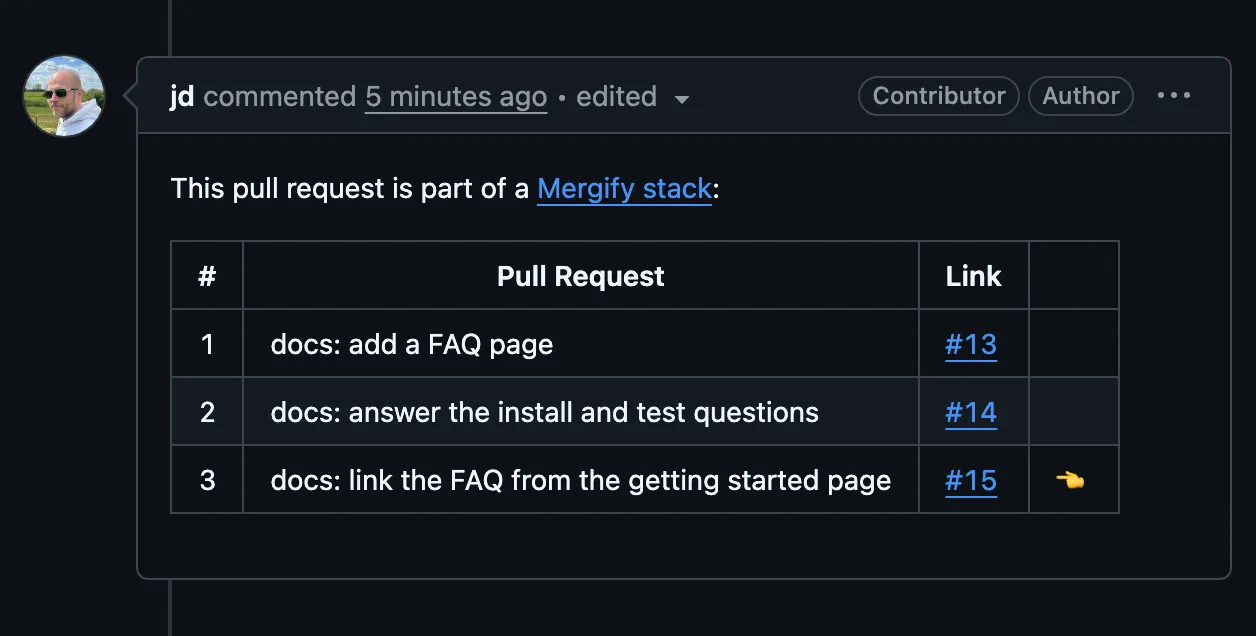
Merge Queue integration. Stacks are queued as a unit:
@mergifyio queue on the top PR enqueues the whole chain
bottom-up, and dequeuing a PR also dequeues the PRs above it. See
Stacked PRs in the Merge Queue.
Coming From a Custom Script
Section titled Coming From a Custom ScriptIf you already wrap git rebase and gh pr create, you don’t have to throw
anything away. Stacks runs on the same Git primitives, so you can adopt it
incrementally:
curl -fsSL https://raw.githubusercontent.com/Mergifyio/mergify-cli/main/install.sh | shmergify stack setupSetup installs the commit-msg hook that adds Change-Ids, a pre-push hook
that nudges you toward mergify stack push, and two hooks that keep a
Change-Id on commits the first one misses (see
Setup). From there:
-
Existing commits without Change-Ids get one when you reword them: run
git rebase -i <base>, mark each commitreword, and the hook fills in the trailer on save. -
Re-runs are safe.
mergify stack pushcompares each commit’s Change-Id and SHA against GitHub and only touches what changed, so running it twice does no extra work. -
There’s an off-ramp. On GitHub, Stacks creates ordinary branches and PRs, plus the revision-history comment it posts on each PR, and a stack comment too when the stack isn’t registered. None of it is a proprietary format. Locally it leaves four things, all of them plain Git: the
Change-Id:trailer in your commit messages, the hook filesmergify stack setupwrote under.git/hooks, thenotes.displayRefandnotes.rewriteRefvalues it set in your local Git config, and arefs/notes/mergify/stacknotes ref carrying the amend notes and revision history. Stop using the CLI and your history is still clean, standard Git; the trailer is an inert line of text, and everything else sits outside the commits.
Getting Started
Section titled Getting Startedcurl -fsSL https://raw.githubusercontent.com/Mergifyio/mergify-cli/main/install.sh | shmergify stack setupmergify stack pushSee the setup guide for the full walkthrough, or Creating Stacks to push your first stack.
Was this page helpful?
Thanks for your feedback!