Reviewing Stacks
A reviewer's guide to navigating and reviewing stacked pull requests.
Stacked PRs look and feel like regular pull requests, just smaller. You don’t need to install anything or learn new tools to review them.
What You’ll See
Section titled What You’ll SeeEach stacked PR contains a single commit’s worth of changes, and every PR tells
you where in the chain you are. For a stack registered with GitHub’s stacking
API, GitHub lists the stack’s members on the pull request page itself. A stack
pushed with --no-github-native carries a stack
comment that does the same job:
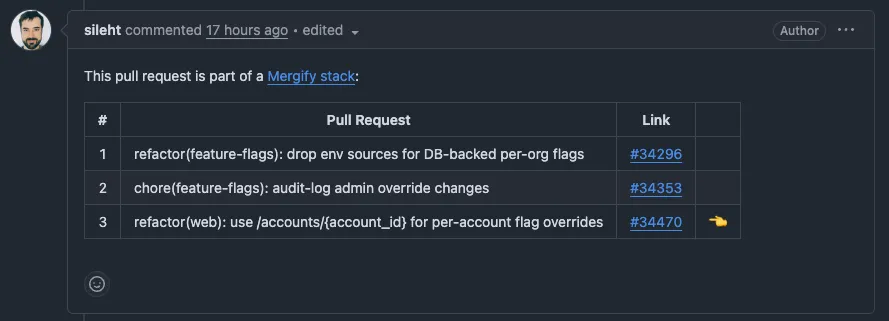
Either way, the list links to every PR in the stack and marks the one you are on, so you can jump between them.
How to Review
Section titled How to ReviewStart from the Bottom
Section titled Start from the BottomReview the stack in order, starting with the first PR (the one targeting
main). Each subsequent PR builds on the previous one, so reviewing in order
gives you the narrative of the change.
Each PR Shows Only Its Own Changes
Section titled Each PR Shows Only Its Own ChangesUnlike a single large PR, each stacked PR’s diff contains only the changes from its corresponding commit, not the accumulated changes of the entire branch:
- PR #1 shows the data model changes
- PR #2 shows only the API endpoint, not the model + endpoint
- PR #3 shows only the tests, not everything combined
You review small, focused diffs instead of trying to parse hundreds of lines at once.
Navigate Between PRs
Section titled Navigate Between PRsUse the links in GitHub’s stack list, or in the stack comment, to move between PRs. The current PR is marked, so you always know where you are in the chain.
Leaving Feedback
Section titled Leaving FeedbackReview comments work exactly like any other PR:
- Leave inline comments on specific lines
- Request changes or approve
- Use GitHub’s review features normally
When the author addresses your feedback, they’ll rebase and push. The PR updates in place, and your review comments stay attached to the relevant lines.
Revision History
Section titled Revision HistoryEach push keeps a revision-history comment on the PR, so you can see how the commit evolved between reviews instead of guessing what changed since you last looked. The timeline marks every revision, from the initial push through later rebases and content edits, and links to the underlying commit SHAs:
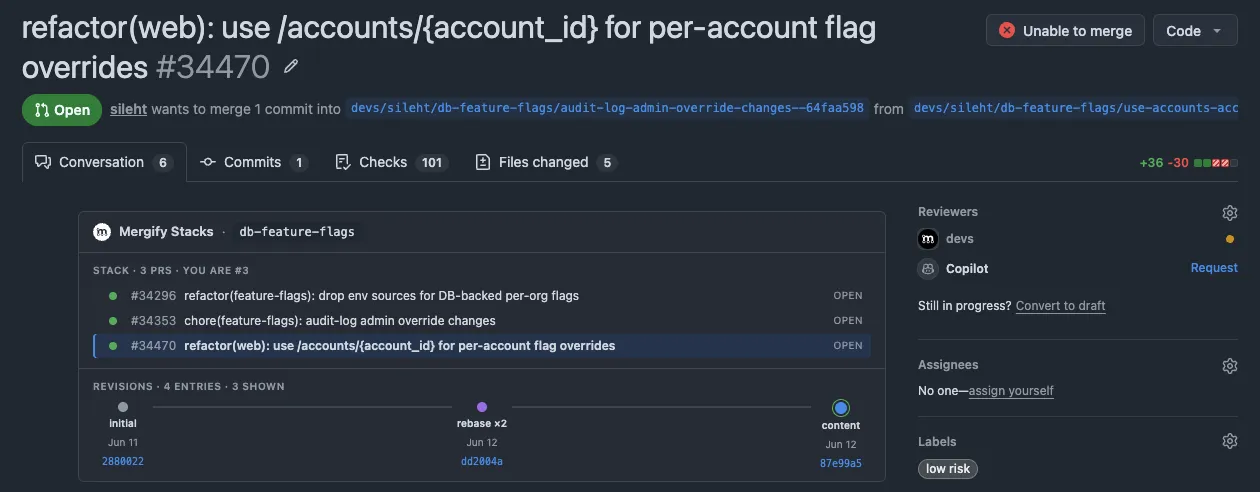
When the author amends a commit, they can attach a short note explaining why. That reason shows up against the matching revision, so you don’t have to diff old and new SHAs to understand what moved.
Merging Stacked PRs
Section titled Merging Stacked PRsStacked PRs merge bottom-up. The first PR in the stack (targeting main)
merges first, and the next one is retargeted onto main. GitHub does that
itself for a stack registered with its stacking API. For a stack pushed with
--no-github-native, it happens when the merged
head branch is deleted, which is why Setup asks you to turn
automatic head-branch deletion on. The author brings the rest of the
stack in line by running
mergify stack sync and pushing again.
You review and merge each PR in turn, working up the chain.
You don’t need to merge the entire stack at once. If the first two PRs are approved but the third needs more work, merge the first two and let the author continue iterating on the rest.
Was this page helpful?
Thanks for your feedback!