Quarantine
Ignore problematic tests in your CI
The quarantine feature lets you isolate broken or flaky tests in your CI pipeline without removing them entirely. Once a test is quarantined, it will still run in your CI, but its failure will be ignored for the purposes of blocking merges or marking a pipeline as failed.
This helps you keep your CI green while maintaining full visibility into test reliability and ongoing issues.
How quarantine works
Section titled How quarantine worksWhen you quarantine a test in the Mergify dashboard, its future executions will continue to be collected by Test Engine, but your CI will ignore failures.
This avoids pipeline disruption while still surfacing issues in the UI and keeping historical data intact.
Quarantined tests must still be uploaded appropriately using one of the supported CI integrations. To ensure the correct setup, refer to the documentation for your test framework.
When Mergify quarantines a test itself
Section titled When Mergify quarantines a test itselfMergify can also quarantine a test on its own, from the health status Detection assigns it. This is auto-quarantine, which you turn on per repository from the Configuration page. By default it quarantines flaky tests only; turn on Also Quarantine Broken Tests to quarantine broken tests too. It does not act on that status as soon as a test looks unhealthy: it waits until there is enough evidence behind the verdict.
Three things have to hold. The test has to have been unhealthy for a while rather than since its last run, because an unhealthy stretch that a single run and its reruns open and close within minutes reads as one bad CI event rather than a flaky test. The run that made it unhealthy must not have made a crowd of other tests unhealthy at the same time, which would point at a CI incident rather than at any one test. And a broken test has to have failed on more than one commit, since a single failure is often fixed by the commit landing right behind it.
Those are the same bars a test has to clear to be worth rerunning, so Mergify reruns and quarantines on the same evidence.
A test that has not run for a while keeps whatever health status it last had, but Mergify stops spending reruns on it, since no recent run backs that verdict any more.
Until a test clears those bars, its status still shows on the dashboard and you can quarantine it yourself; Mergify will not do it for you.
Leaving quarantine automatically
Section titled Leaving quarantine automaticallyWith unquarantine_when_healthy turned on, Mergify removes a test from
quarantine once it is healthy again on the default branch, meaning Detection
no longer finds it flaky or broken. A test you have fixed counts toward your CI
again without you going back to the dashboard.
The option is off by default. You can set it on a quarantine you create yourself, from the dashboard or the API. For the tests Mergify quarantines for you, turn on Unquarantine Recovered Tests Automatically on the Configuration page, so they end the same way. Turning it on for auto-quarantine does not change quarantines that already exist.
Health is tracked on the default branch, so that is the only branch this watches. A quarantine you limited to some other branch stays until you remove it, even with the option on: the default branch says nothing about how the test behaves there.
Adding and removing tests from quarantine
Section titled Adding and removing tests from quarantineFrom the Mergify dashboard
Section titled From the Mergify dashboardThe Detection page on the dashboard lists the tests that Test Engine collected from your CI runs, with the State of each one. From there, you can add or remove a test from quarantine. See quarantine on Detection for the cleanups it suggests.
From the Mergify CLI
Section titled From the Mergify CLIThe Mergify CLI can manage quarantines from the terminal, which is handy for scripting or for letting an AI coding agent quarantine a flaky test it just hit:
# Quarantine a test.mergify tests quarantines add -r owner/repo \  --reason "flaky under load, fix in progress" \  "tests/auth/test_login.py::test_login_timeout"
# Remove it from quarantine.mergify tests quarantines remove -r owner/repo \  "tests/auth/test_login.py::test_login_timeout"
# List everything currently quarantined.mergify tests quarantines list -r owner/repo
A quarantine is scoped to a branch, a pipeline and a job, so a test quarantined
in more than one scope holds one quarantine per scope. remove and get then
refuse the test name, because it does not say which of them to act on: pass the
quarantine id that add and list print instead.
See the tests CLI reference for all flags and exit codes.
A quarantine does not have to be removed by hand at all: see leaving quarantine automatically for the option that ends one once the test is healthy again.
Fixing a quarantined test with AI
Section titled Fixing a quarantined test with AIQuarantine keeps a test from blocking merges, but the test still needs a fix. Click a test on the Detection page to open its details: when the test is quarantined, each of its quarantines has a Fix with AI button next to Unquarantine. It turns what Mergify knows about the test into instructions for an AI coding agent.
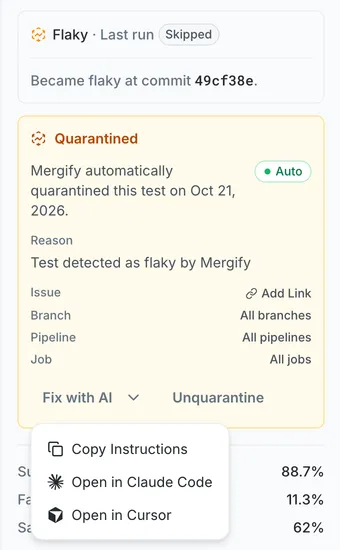
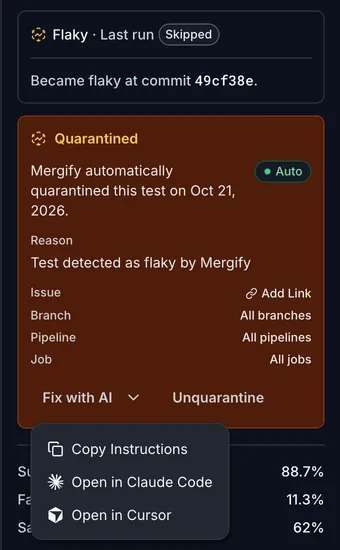
Copy Instructions copies them to your clipboard, to paste into any agent. The other entries open an editor with the instructions as its prompt:
-
Open in Claude Code asks for the absolute path of your local clone of the repository, then opens Claude Code there. Leave the path empty to open the clone you last ran Claude Code in. Your browser remembers the path for each repository.
-
Open in Cursor opens Cursor.
The instructions ask the agent to reproduce the failure, find its root cause, and fix it in the test or in the code under test, without deleting the test, skipping it, or marking it as expected to fail. They carry the context the dashboard shows for the test:
-
the quarantine: whether you or Mergify applied it, when, its reason, and the branch, pipeline, and job it covers
-
the test: its name, file, function, framework, and language
-
its health: current status, success, failure, and flaky rates, its last success, and its first and last failures, with the pull request where it first failed
-
its last 10 health transitions and up to 3 recent failures, with the start of each error message
Test output and pull request titles are quoted and marked as data, so the agent investigates them without following any instructions they contain. The button stays disabled until the failure and health history have loaded, so the instructions never go out without them.
Claude Code and Cursor cap the length of a prompt opened this way, so long instructions are cut from the end: what to do comes first and is kept, and the recent failures are the first to go. Copy Instructions always copies the full instructions.
Staying notified
Section titled Staying notifiedQuarantine and dequarantine actions, whether you make them yourself or Mergify applies them automatically, are recorded as events you can review on the dashboard and act on. You can also have Mergify post them to a Slack channel as they happen: see Test Engine notifications to set one up.
Was this page helpful?
Thanks for your feedback!